
Remote work account security: scams, passwords and public Wi-Fi
By SOJI Research · Updated November 5, 2026
By the SOJI editorial team · Reviewed 5 November 2026
Remote work account security comes down to three things: telling a real job offer from a scam, giving each platform its own password, and knowing what a VPN does and does not do. People who work on AI-training and freelance platforms carry more risk in those three places than most, because one email address, one phone number and one set of bank details are tied to several accounts at once.
Key takeaways
- According to the FTC, honest employers never ask you to pay to get a job. A request for money, a check to deposit or an ID document before an offer is where you stop.
- Use a long, unique password for every platform and turn on multi-factor authentication wherever it is offered. Current NIST guidance favors length over forced symbols.
- A VPN encrypts your traffic on public Wi-Fi. It does not change the country a platform sees you in, and trying to do that can break a platform's rules.
- Most account takeovers start with a message that looks routine. Go to the platform by typing its address yourself, not through a link in a message.
Know which platforms really pay, before you apply
Weekly: verified roles and pay data for your country.
Free · 1 email per week · Unsubscribe anytime
How to recognize a job scam
A fake recruiter needs two things: your trust and something from you, usually money or personal data. The FTC's job scams guidance names the patterns, and they apply to fake AI-training offers too. Seven checks, in the order you would meet them:
- The offer promises big pay for little work. The FTC calls this almost certainly a scam.
- You are asked to pay for anything. Training, a starter kit, a software license or equipment all count. A real employer does not charge you to start.
- A check arrives and you are told to send part of it on. The FTC's advice is never to bank on a check that looks cleared.
- The work is receiving and reshipping parcels. That is a scam, not a job.
- Bank details or an ID number are requested before an offer. The FTC warns that information handed over for "payroll" can lead to identity theft.
- You cannot confirm who the recruiter is. Search the company and the person's name together with words such as "scam" or "complaint", as the FTC suggests, and check that the platform in the message is the one you applied to.
- You are pushed to answer fast. Urgency is a reason to slow down and check.
Our guides on how to verify a remote job is real, how to spot legitimate AI training jobs and avoid scams and interview red flags go deeper on each of these. For a specific platform, see is Mercor legit and is Micro1 legit.
If you have already paid or shared sensitive data, the FTC's page on what to do if you were scammed lists the steps, and you can report it at ReportFraud.ftc.gov.
One password for each platform
If you reuse a password, one leak opens every account that shares it, and the accounts you use to get paid are the ones worth taking. Your email address is usually the recovery route for all of them, so a stolen email password is the worst case.
NIST's current guidance for services that check passwords (SP 800-63B-4) is useful here, because it moved away from habits many people still follow:
- A password that is the only factor should be at least 15 characters. When it is paired with a second factor, the minimum is eight.
- Services should not force a mix of character types, and should not force periodic changes unless there is evidence of compromise.
- Services should check new passwords against lists of common and compromised passwords, and should allow password managers and pasting.
In practice, a long phrase of unrelated words, unique to each platform, is stronger and easier to live with than a short password dressed up with symbols. You change it when you have a reason to, such as a breach notice.
There are three realistic ways to keep many unique passwords:
- The manager built into your browser or phone. Free and already there, but tied to one device family.
- A standalone password manager, such as Bitwarden, 1Password or NordPass. It works across devices. The master password becomes the key to everything, so it needs to be long, unique and protected with a second factor.
- A paper notebook kept at home. It cannot be hacked remotely, and it can be lost, damaged or read by anyone who visits.
Whichever you pick, turn on multi-factor authentication. The FTC notes that it helps keep scammers out even when they have your password. A separate email address for work platforms also keeps a leak from a shopping site away from them.
Phishing is how many passwords are stolen. The FTC's phishing guidance states that legitimate companies do not email or text a link to update your payment information. If a message says there is a problem with your account, close it and contact the company through a website or number you already know.
The infographic below lists what to keep out of a password.
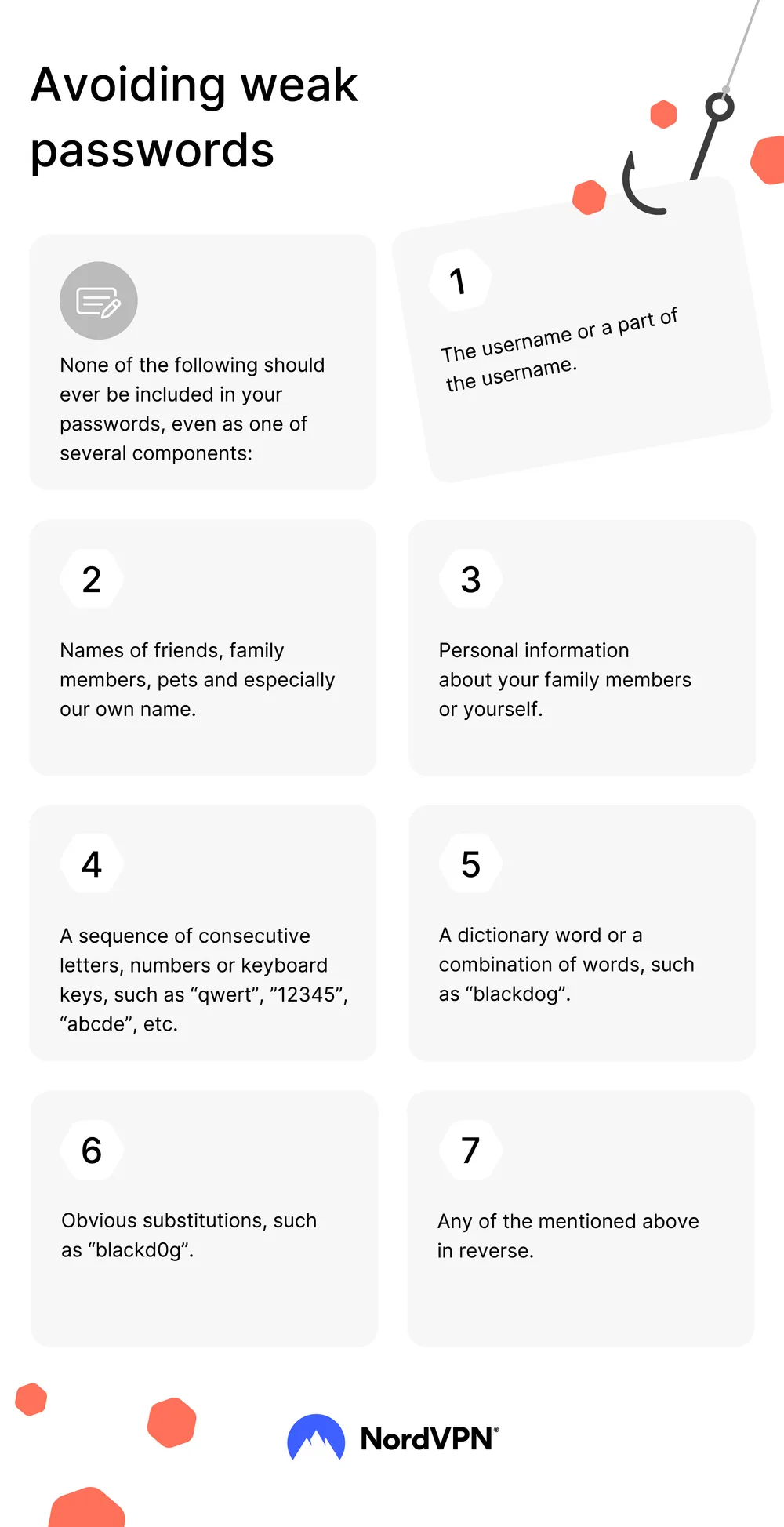
Image: NordVPN.
Do you need a VPN to work remotely?
A VPN encrypts the traffic between your device and the VPN provider. That matters on public networks. The FTC has warned that free public Wi-Fi is often insecure, and its tips on VPN apps describe them as a way to shield personal information sent over open Wi-Fi. If you work from cafés, airports or shared offices, that is a reasonable use.
On your home network, a VPN adds much less. It does not stop phishing, it does not fix a reused password, and it does not make a platform trust you.
One point needs care. A VPN can make your connection appear to come from another country, and some people are tempted to use that when a platform is not open in their region. Platforms may check where you work from and who you are, and a connection that does not match can trigger a review or a block. Read each platform's rules before you use a VPN on it, and never use one to change the country you apply from. A VPN protects your connection. It is not a way to meet an eligibility rule.
If you do choose a VPN, the FTC suggests researching the app before downloading it, reading the permissions it requests, confirming that it encrypts your data and finding out whether it shares your data with third parties.
Frequently asked questions
What should I do if I clicked a suspicious link?
Update your security software and run a scan. Then change the passwords for any account you used on that device, starting with your email, using a device you trust. If you shared sensitive details such as a bank or ID number, the FTC points to IdentityTheft.gov for next steps, and you can report the message at ReportFraud.ftc.gov.
Is a password manager safe to use?
NIST's guidance expects services to allow them, because they make unique passwords practical. The risk moves to the master password, so make it long and unique, and add multi-factor authentication to the manager itself. Keep a recovery method somewhere safe.
Can I use a VPN on AI-training platforms?
It depends on the platform. Some check your location and identity, and a VPN may cause problems. Read the platform's own help pages first, and if they are unclear, ask support before you connect through one.
Limitations
This is general information, not a security audit or professional advice. The FTC pages are written for readers in the United States, and NIST's guidance describes what services should require, not what every platform does. Platform rules change, so check the current ones. We cannot tell you whether a particular offer is genuine.
Safe accounts are half of a good application. The other half is your CV, and you can check it for free in about three minutes.
Sources and further reading
- FTC: Job Scams: how to spot and avoid job scams
- FTC: What To Do if You Were Scammed: steps to take after a scam
- ReportFraud.ftc.gov: report a scam to the US Federal Trade Commission
- NIST SP 800-63B-4: Authentication and Authenticator Management: Current US guidance on password length, composition rules, forced changes and checks against breached passwords.
- FTC: How To Recognize and Avoid Phishing Scams: FTC advice on recognizing phishing messages, multi-factor authentication and what to do if you clicked.
- FTC: FTC Provides Tips on Using VPN Apps: FTC tips on VPN apps: research the app, check permissions, encryption and data sharing (February 2018).
SOJI is an independent job board and is not affiliated with Mercor or Micro1. If you apply through our referral links and are hired, SOJI may earn a commission, at no cost to you, and this does not affect which jobs we publish. More on the about page.
Is your CV ready for applications?
Free check: your score and what to fix, on screen.
PartnerIf you buy through this link, SOJI may earn a commission at no extra cost to you. It never changes what we write or which jobs we list.
A password manager for all your platform accounts
If you keep accounts on several platforms, a password manager helps you use a different password on each one.
See NordPass →A VPN for public Wi-Fi
A VPN encrypts your connection on public networks. It does not change which country a platform sees you applying from, and platforms may restrict VPN use. Read their rules first.
 See NordVPN →
Know which platforms really pay, before you apply
Weekly: verified roles and pay data for your country.
Free · 1 email per week · Unsubscribe anytime
Related open roles

Registered Nurse
Micro1 is hiring registered nurses with inpatient experience to help evaluate AI on clinical tasks. Remote, $60-$70/hr.

Vietnamese Linguistic Experts
Mercor is hiring Vietnamese linguistic experts to evaluate and improve AI model output in Vietnamese. Remote, part-time, $30/h.
Pharmaceutical R&D Domain Expert
Full-time W-2 role reviewing pharmaceutical R&D tasks and building golden solutions and benchmarks for a leading AI lab. Hybrid in the Bay Area, CA, $75-$115/hr.
More in Safety & scams
Mercor Instant Offer: What It Means and How to Verify It
What Mercor's help pages say about Instant Offers: where to find one, what happens after you accept, and how it differs from "under review".
Read moreHow to Verify a Remote Job Is Real: 8 Checks
Eight checks to tell whether a remote job is real before you share personal data, with FTC guidance and what to do if you were scammed.
Read moreBest Remote Job Boards: How to Judge Whether They Are Legitimate
Five tests for choosing a legitimate remote job board, the types of boards and how to combine two or three sources.
Read more